
Add InnBucks checkout to any web store
Two calls and a redirect: your server creates a payment and gets a
checkout_url; you send the shopper there (or pop it over your page); you confirm with a signed
webhook. Below are working snippets for every major backend and frontend, plus drop-in widgets.
The browser never sees your sk_live_… key. The shopper only ever receives a
checkout_url, which is a single unguessable payment. Always create the payment server-side.
Three ways to take the payment
Redirect
Send the shopper to the hosted checkout_url; they return to your success_url. Simplest.
Popup widget
Keep them on your page; pos.js opens checkout in a popup and reports back. One script + one button.
Payment link
Create a payment anywhere and share the checkout_url by email, SMS or WhatsApp. No frontend at all.
What it looks like
You style the button to match your store; here is a typical one and the branded InnBucks popup it opens.
Your button (drop-in widget)
Tapping it opens the popup on the right (or a full-page redirect on mobile / when popups are blocked).
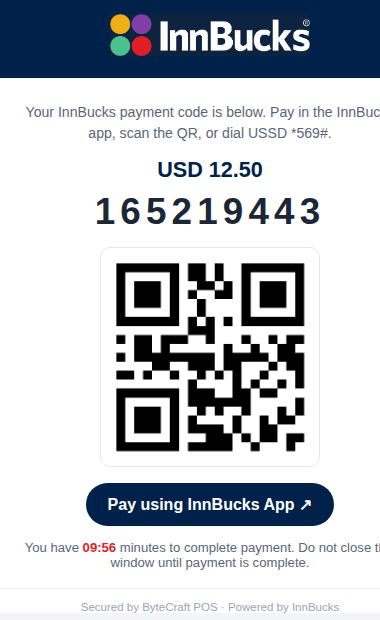
You never build the payment screen. The popup shows the code, a scannable QR, a "Pay using InnBucks App"
deep link, USSD *569# instructions and a 10-minute countdown, then returns the shopper to your
success_url the moment it is paid.
Step 1 · Create a payment on your server
Every backend does the same thing: POST /v1/payments with your secret key, an
Idempotency-Key, the amount in cents, and your success/cancel URLs. Return the
checkout_url to the browser. Pick your stack:
Node.js
import express from "express";
const app = express();
const KEY = process.env.POS_SECRET_KEY;            // sk_live_… (server-side only)
const POS = "https://omniway.online";

// Your storefront calls this to start a payment.
app.post("/api/create-payment", async (req, res) => {
  const order = req.body;                          // { id, totalCents }
  const r = await fetch(`${POS}/v1/payments`, {
    method: "POST",
    headers: {
      "Authorization": `Bearer ${KEY}`,
      "Content-Type": "application/json",
      "Idempotency-Key": `order-${order.id}`,      // safe to retry
    },
    body: JSON.stringify({
      amount_cents: order.totalCents,
      currency: "USD",
      merchant_ref: String(order.id),
      success_url: "https://shop.example/thanks",
      cancel_url: "https://shop.example/cart",
    }),
  });
  const payment = await r.json();
  if (payment.error) return res.status(400).json(payment);
  res.json({ checkout_url: payment.checkout_url }); // send this to the browser
});
PHP (plain & Laravel)
<?php
// POST /api/create-payment  (Laravel controller or plain PHP endpoint)
$key   = getenv('POS_SECRET_KEY');                 // sk_live_…
$order = json_decode(file_get_contents('php://input'), true);

$ch = curl_init('https://omniway.online/v1/payments');
curl_setopt_array($ch, [
  CURLOPT_RETURNTRANSFER => true,
  CURLOPT_POST => true,
  CURLOPT_HTTPHEADER => [
    'Authorization: Bearer ' . $key,
    'Content-Type: application/json',
    'Idempotency-Key: order-' . $order['id'],
  ],
  CURLOPT_POSTFIELDS => json_encode([
    'amount_cents' => $order['totalCents'],
    'currency'     => 'USD',
    'merchant_ref' => (string) $order['id'],
    'success_url'  => 'https://shop.example/thanks',
    'cancel_url'   => 'https://shop.example/cart',
  ]),
]);
$payment = json_decode(curl_exec($ch), true);
header('Content-Type: application/json');
echo json_encode(['checkout_url' => $payment['checkout_url']]);
Python (Flask & Django)
import os, requests
from flask import Flask, request, jsonify
app = Flask(__name__)
KEY = os.environ["POS_SECRET_KEY"]                 # sk_live_…
POS = "https://omniway.online"

@app.post("/api/create-payment")
def create_payment():
    order = request.get_json()
    r = requests.post(f"{POS}/v1/payments",
        headers={
            "Authorization": f"Bearer {KEY}",
            "Idempotency-Key": f"order-{order['id']}",
        },
        json={
            "amount_cents": order["totalCents"],
            "currency": "USD",
            "merchant_ref": str(order["id"]),
            "success_url": "https://shop.example/thanks",
            "cancel_url": "https://shop.example/cart",
        })
    payment = r.json()
    if "error" in payment:
        return jsonify(payment), 400
    return jsonify(checkout_url=payment["checkout_url"])
Ruby (Rails & Sinatra)
require "net/http"; require "json"
KEY = ENV["POS_SECRET_KEY"]                         # sk_live_…

# POST /api/create-payment
def create_payment(order)
  uri = URI("https://omniway.online/v1/payments")
  req = Net::HTTP::Post.new(uri,
    "Authorization"   => "Bearer #{KEY}",
    "Content-Type"    => "application/json",
    "Idempotency-Key" => "order-#{order[:id]}")
  req.body = {
    amount_cents: order[:total_cents], currency: "USD",
    merchant_ref: order[:id].to_s,
    success_url: "https://shop.example/thanks",
    cancel_url:  "https://shop.example/cart",
  }.to_json
  res = Net::HTTP.start(uri.host, uri.port, use_ssl: true) { |h| h.request(req) }
  JSON.parse(res.body)["checkout_url"]
end
Java (Spring Boot)
// POST /api/create-payment
var body = """
  { "amount_cents": %d, "currency": "USD", "merchant_ref": "%s",
    "success_url": "https://shop.example/thanks",
    "cancel_url":  "https://shop.example/cart" }
  """.formatted(order.totalCents(), order.id());

var req = HttpRequest.newBuilder(URI.create("https://omniway.online/v1/payments"))
    .header("Authorization", "Bearer " + System.getenv("POS_SECRET_KEY"))
    .header("Content-Type", "application/json")
    .header("Idempotency-Key", "order-" + order.id())
    .POST(HttpRequest.BodyPublishers.ofString(body))
    .build();

var res = HttpClient.newHttpClient().send(req, HttpResponse.BodyHandlers.ofString());
String checkoutUrl = new JSONObject(res.body()).getString("checkout_url");
Go
key := os.Getenv("POS_SECRET_KEY")
body, _ := json.Marshal(map[string]any{
    "amount_cents": order.TotalCents, "currency": "USD",
    "merchant_ref": order.ID,
    "success_url":  "https://shop.example/thanks",
    "cancel_url":   "https://shop.example/cart",
})
req, _ := http.NewRequest("POST", "https://omniway.online/v1/payments", bytes.NewReader(body))
req.Header.Set("Authorization", "Bearer "+key)
req.Header.Set("Content-Type", "application/json")
req.Header.Set("Idempotency-Key", "order-"+order.ID)
res, _ := http.DefaultClient.Do(req)
var payment struct{ CheckoutURL string `json:"checkout_url"` }
json.NewDecoder(res.Body).Decode(&payment)
// redirect the shopper to payment.CheckoutURL
.NET (C#)
// POST /api/create-payment
var http = new HttpClient();
http.DefaultRequestHeaders.Authorization =
    new("Bearer", Environment.GetEnvironmentVariable("POS_SECRET_KEY"));

var req = new HttpRequestMessage(HttpMethod.Post, "https://omniway.online/v1/payments");
req.Headers.Add("Idempotency-Key", $"order-{order.Id}");
req.Content = JsonContent.Create(new {
    amount_cents = order.TotalCents, currency = "USD",
    merchant_ref = order.Id.ToString(),
    success_url = "https://shop.example/thanks",
    cancel_url  = "https://shop.example/cart",
});
var payment = await (await http.SendAsync(req)).Content.ReadFromJsonAsync<JsonElement>();
string checkoutUrl = payment.GetProperty("checkout_url").GetString();
Step 2 · Send the shopper to pay
Full redirect
// Cheapest integration: get a checkout_url from your server, send them there.
const { checkout_url } = await fetch("/api/create-payment", {
  method: "POST", headers: { "Content-Type": "application/json" },
  body: JSON.stringify({ id: order.id, totalCents: order.totalCents }),
}).then(r => r.json());
location.href = checkout_url;     // returns to your success_url when paid
Drop-in widget (no JavaScript to write)
Include pos.js once, then mark any button with data-pos-pay. It calls your
endpoint, opens the InnBucks popup, and redirects to your success page when paid.
<!-- 1) include the widget once -->
<script src="https://omniway.online/static/pos.js"></script>

<!-- 2) any button with data-pos-pay becomes a payment button. It POSTs to
     your endpoint, gets {checkout_url}, opens the InnBucks popup, then
     redirects to data-success?payment_id=… when paid. -->
<button data-pos-pay
        data-endpoint="/api/create-payment"
        data-success="/thank-you">
  Pay with InnBucks
</button>

<!-- Already have a checkout_url (e.g. a payment link)? Skip the server hop: -->
<button data-pos-pay data-checkout-url="https://omniway.online/checkout/7303405f-…">
  Pay now
</button>
Programmatic popup
<script src="https://omniway.online/static/pos.js"></script>
<script>
  document.querySelector("#pay").onclick = async () => {
    const { checkout_url } = await fetch("/api/create-payment", { method: "POST" }).then(r => r.json());
    POS.pay({
      checkoutUrl: checkout_url,
      onSuccess: ({ payment_id }) => location.href = "/thanks?p=" + payment_id,
      onCancel:  ({ reason })     => console.log("not paid:", reason),
    });
  };
</script>
React
import { useState } from "react";

export function PayButton({ order }) {
  const [busy, setBusy] = useState(false);
  async function pay() {
    setBusy(true);
    const { checkout_url } = await fetch("/api/create-payment", {
      method: "POST", headers: { "Content-Type": "application/json" },
      body: JSON.stringify(order),
    }).then(r => r.json());
    // window.POS comes from /static/pos.js (load it once in index.html)
    window.POS.pay({ checkoutUrl: checkout_url,
      onSuccess: ({ payment_id }) => (location.href = `/thanks?p=${payment_id}`),
      onCancel:  () => setBusy(false) });
  }
  return <button onClick={pay} disabled={busy}>Pay with InnBucks</button>;
}
Vue
<script setup>
const props = defineProps(["order"]);
async function pay() {
  const { checkout_url } = await fetch("/api/create-payment", {
    method: "POST", headers: { "Content-Type": "application/json" },
    body: JSON.stringify(props.order),
  }).then(r => r.json());
  window.POS.pay({ checkoutUrl: checkout_url,
    onSuccess: ({ payment_id }) => (location.href = `/thanks?p=${payment_id}`) });
}
</script>
<template><button @click="pay">Pay with InnBucks</button></template>
Step 3 · Confirm with a webhook
Fulfil the order on the payment.paid webhook (verify the signature), never on the browser
redirect alone. The signature is X-Pos-Signature: t=<unix>,v1=HMAC_SHA256(secret, t + "." + rawBody).
Node.js
import crypto from "node:crypto";
import express from "express";

// Use the RAW body — re-stringifying changes the bytes and breaks the HMAC.
app.post("/hooks/pos", express.raw({ type: "application/json" }), (req, res) => {
  const sig = req.get("x-pos-signature") || "";
  const m = /^t=(\d+),v1=([a-f0-9]+)$/.exec(sig);
  if (!m || Math.abs(Date.now()/1000 - +m[1]) > 300) return res.status(400).end();
  const expected = crypto.createHmac("sha256", process.env.POS_WHSEC)
    .update(`${m[1]}.${req.body}`).digest("hex");
  if (!crypto.timingSafeEqual(Buffer.from(expected), Buffer.from(m[2]))) return res.status(400).end();

  const e = JSON.parse(req.body);
  if (e.type === "payment.paid") markOrderPaid(e.data.merchant_ref);
  res.status(200).end();                            // 2xx fast; do slow work async
});
PHP
<?php
$raw = file_get_contents('php://input');
$sig = $_SERVER['HTTP_X_POS_SIGNATURE'] ?? '';
preg_match('/^t=(\d+),v1=([a-f0-9]+)$/', $sig, $m);
if (!$m || abs(time() - (int)$m[1]) > 300) { http_response_code(400); exit; }
$expected = hash_hmac('sha256', $m[1] . '.' . $raw, getenv('POS_WHSEC'));
if (!hash_equals($expected, $m[2])) { http_response_code(400); exit; }

$e = json_decode($raw, true);
if ($e['type'] === 'payment.paid') mark_order_paid($e['data']['merchant_ref']);
http_response_code(200);
Python
import hmac, hashlib, time
from flask import request

@app.post("/hooks/pos")
def pos_hook():
    raw = request.get_data()                        # raw bytes, not parsed
    sig = request.headers.get("X-Pos-Signature", "")
    t, _, v1 = sig.partition(",")
    t = t.removeprefix("t="); v1 = v1.removeprefix("v1=")
    if abs(time.time() - int(t)) > 300: return "", 400
    expected = hmac.new(os.environ["POS_WHSEC"].encode(),
                        f"{t}.{raw.decode()}".encode(), hashlib.sha256).hexdigest()
    if not hmac.compare_digest(expected, v1): return "", 400
    e = request.get_json()
    if e["type"] == "payment.paid": mark_order_paid(e["data"]["merchant_ref"])
return "", 200Parse-then-restringify changes the body and breaks the HMAC. Read the raw request body for verification,
then parse. No public endpoint? Poll GET /v1/events?since=… instead.
E-commerce platforms
Any platform that lets you add a custom payment method works the same way — redirect to the
checkout_url on checkout, mark the order paid on the webhook.
WooCommerce / WordPress
<?php
// In a tiny custom gateway, redirect to InnBucks on checkout:
add_action('woocommerce_api_innbucks', function () {
  $order = wc_get_order($_GET['order_id']);
  $body  = wp_remote_post('https://omniway.online/v1/payments', [
    'headers' => [
      'Authorization'   => 'Bearer ' . get_option('innbucks_secret'),
      'Content-Type'    => 'application/json',
      'Idempotency-Key' => 'wc-' . $order->get_id(),
    ],
    'body' => wp_json_encode([
      'amount_cents' => (int) round($order->get_total() * 100),
      'currency'     => $order->get_currency(),
      'merchant_ref' => (string) $order->get_id(),
      'success_url'  => $order->get_checkout_order_received_url(),
      'cancel_url'   => $order->get_cancel_order_url(),
    ]),
  ]);
  $p = json_decode(wp_remote_retrieve_body($body), true);
  wp_redirect($p['checkout_url']); exit;
});
Shopify, Magento, OpenCart and PrestaShop follow the same shape inside their gateway/extension APIs:
create the payment server-side, redirect to checkout_url, settle on the webhook.
Widget & integration options
| Option | Frontend effort | Best for |
|---|---|---|
| Hosted redirect | One line (set location.href) | Most stores; least to maintain |
Drop-in widget (data-pos-pay) | One script + one button, no JS | Static sites, CMS pages, fast add |
pos.js popup (POS.pay) | A few lines | Keeping shoppers on-page (SPA) |
| Payment link | None | Invoices, WhatsApp/SMS, social selling |
| Inline render (code + QR) | You render code/qr_png_data_url | Kiosks, custom checkout UIs |
Use a sk_test_… key — payments auto-settle in ~18 seconds and
POST /checkout/<id>/mockpay settles instantly for automated tests. See
Sandbox.